I use a text editor for pretty much all of my draft writing. I can date this pretty much to 1993, when Microsoft Word 6.0 was released. It really sucked and, after many years of using a word processor, I quit using one for writing.
I did most of my early writing by hand or using a typewriter. I took “secretarial typing” in high school — they changed the name that year to “business typing” which was perceived as less sexist. I was the only boy in the class. There was a “personal typing” class that required students to learn to type 45 words per minute. But in secretarial typing, you needed to learn touch typing (to not look at the keyboard) and type 60 words per minute. It was perhaps the single most useful class I ever took in my life.
I also learned to use DEC computers with a paper terminal in high school. Mostly, I was programming in BASIC. There was rather crude text editing, but I could see the potential for writing text. There was a text formatting program called RUNOFF that I experimented with a little bit, but it was too complicated for my purposes and so I never actually used it for anything. But I could see the potential.
When I went to college, my family purchased a Smith Corona electric typewriter for me as a gift for going to college.
As an undergraduate, I learned to use a word processing system — maybe ALL-IN_1 — on the VAX computer at Alma College. It used a “gold key” to access formatting commands and you could do a lot of amazing things. I had been using my typewriter to write papers, but quickly switched to writing everything using the word processor.
Around that time, a friend kept asking to borrow my typewriter. I didn’t mind since it wasn’t like I used it anymore: once you got used to using the word processor, the idea of going back to using a typewriter was a monstrous impossibility. I kept suggesting that he learn to use the word processor, but he always claimed to not have time. So I finally said I would type his paper for him using the word processor.
There was a central terminal room, but we went to a small computer lab in the life science building. I logged in and quickly typed his paper. Then I printed it using the dot-matrix printer in the lab. He looked at it skeptically, then said, “Yeah. OK. But it has a widow.”
“Let’s fix that,” I said. I typed a few keystrokes and printed again. When I handed him the output, his eyes got bigger and bigger and bigger.
“You can print it again?” he breathed.
He got an account the next morning.
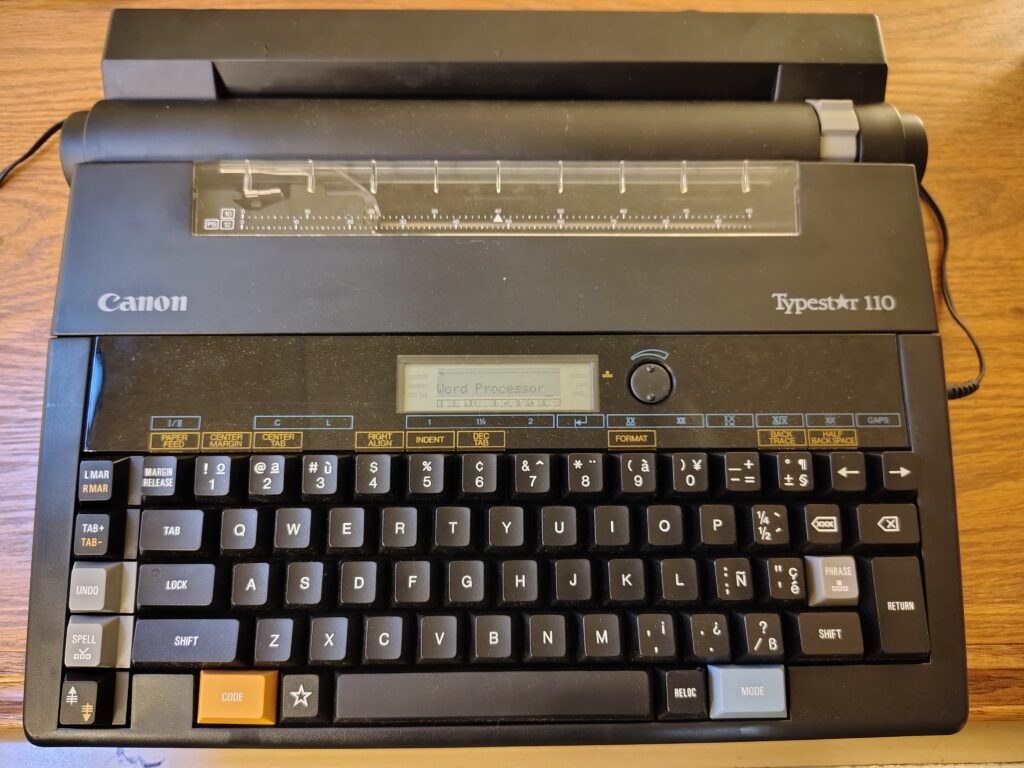
I had other computers along the way (including the odd typewriter/wordprocessor hybrid pictured above) but when I started graduate school, I bought a Powerbook 100 and a copy of Microsoft Word 5.1. It was amazing. It was perhaps the best word processing system I ever used. I used it to write all my papers as a graduate student, including my gigantic 200 page dissertation that had 88 figures and 15 tables.
Then Word 6.0 came out and it was garbage. It was clunky and unstable. It frequently crashed and you lost what you’d been working on. Its documents frequently became corrupted and were unrecoverable. I kept using my old copy of Word for a while, but it was clear its days were numbered. So I switched to doing all of my draft writing using a text editor — so at least I wouldn’t lose my writing.
On a Mac, the best GUI text editor for a long time was BBEdit. I used that for a number of years, then (when it quit being shareware) I switched to TextWrangler.
Note: I’m leaving out the whole chapter where I learned Unix and the vi editor. I used vi a lot for programming, but there wasn’t a native vi for classic MacOS, so it wasn’t something that was convenient to use for local files until MacOS X came out. So, although I use vi a lot, I never used it much for writing.
When I began teaching the writing class, at first I chose different packages for Macs and PCs. Then I started using Linux myself and started looking for applications that would work identically on all three platforms. Eventually, I settled on Atom, which was released in 2015 and I started using that.
Atom was an adequate text editor. It was built on Electron, which made it a bit bloated and clunky. But it worked exactly the same on all three platforms. It was also highly configurable and had a lot of community add-ons to provide additional functionality.
In 2018, Microslop purchased Github, and in 2022 killed off development of Atom — probably to force people to use their proprietary development environment. But, because Atom was Free Software, the developers promptly forked it and renamed it Pulsar. It works exactly like Atom did and I still use it today.
I had very little success persuading students to use a text editor to write. And I didn’t see many other people using text editors either until this year. Suddenly EVERYONE seems to be using text editors to write. Weird. I guess everything old is new again.
A bunch of people seem to be using Obsidian. Tobias Buckell described building a whole writing environment based on Obsidian. Other people are using Notion and NotebookLM and there are a bunch of others.
I’ll keep using Pulsar, at least until I finish teaching the writing class. Then, maybe, I’ll look at others to see if I can find something I like better. But I’ll still want something that is Free Software and cross platform.
